

Convert audio to the sample rate your workflow needs
EZ CD Audio Converter prepares audio at the required sample rate for music libraries, video production, mastering workflows and high-resolution playback. Convert between standard and high-resolution rates such as 44.1, 48, 88.2, 96, 176.4, 192, 352.8 and 384 kHz.
Change sample rate, bit depth, bitrate and file format in one batch job. Supported metadata and album artwork can be retained, and output folders can follow the existing library structure.
44.1 kHz, 48 kHz, 96 kHz and 192 kHz explained
44.1 kHz is the standard sample rate for Audio CD and many music libraries. 48 kHz is common in video and multimedia production. Higher sample rates such as 88.2, 96, 176.4 and 192 kHz are common in high-resolution audio and production workflows.
- 44.1 kHz: common for music distribution and CD-quality libraries.
- 48 kHz: common for video, broadcast and multimedia audio.
- 88.2 / 96 kHz: practical high-resolution output for many playback systems.
- 176.4 / 192 kHz and higher: useful when the production or playback chain requires it.
How to convert audio sample rate
- Add FLAC, WAV, AIFF, ALAC, MP3, AAC, DSD or other supported files.
- Choose the output format.
- Select the target sample rate, such as 44.1 kHz, 48 kHz, 96 kHz or 192 kHz.
- Choose bit depth, bitrate and metadata options if needed.
- Start the batch conversion.
SoX resampling with gapless audio handling
The integrated SoX resampler uses high-precision processing for tasks such as 96 kHz to 44.1 kHz music conversion, 48 kHz video delivery and downsampling 192 kHz source files. Gapless handling and selectable passband and aliasing options give additional control over technical results.
Precision audio processing for sample rate conversion
- Ultra precise (64-bit floating point) audio engine
- Professional quality sample rate converter
- High-quality SoX sample rate conversion
- Gapless resampling for continuous albums and track transitions
- Convert 96 kHz and 192 kHz audio to 44.1 kHz or 48 kHz
- Change sample rate, bit depth, bitrate and audio format in one job
- High-precision audio conversion with gapless handling for supported formats
- High quality dithering (RTN, RPDF, TPDF, Noise-shaped)
- Built-in audio codecs with no external codec packs required
- Audio data is always transferred in ultra-precise 64-bit floating point accuracy during audio conversions
Independent sample rate conversion tests
The SoX sample rate converter used in EZ CD Audio Converter has been tested in third-party sample rate converter quality tests at src.hydrogenaudio.org.
Quality Test Reports
Test Results - Default | Passband 95 %
Test Results - Default | Passband 95 % | Allow aliasing
Test Results - Steep | Passband 99 %
Test Results - Steep | Passband 99 % | Allow aliasing
Test Results - Maximum | Passband 99.7 %
Test Results - Maximum | Passband 99.7 % | Allow aliasing
Passband
The resampler passband setting determines how much of the frequency content of the original signal is preserved during conversion. The term passband refers to all frequencies up to the bandwidth point. For 44.1 kHz sampling rate and a 95% passband, the preserved passband represents frequencies from 0 Hz to about 21 kHz. Increasing the passband can preserve more frequency content, but conversion becomes slower and transient echo artifacts may increase.
Default | 95% passband

Default sweep 95% - Conversion from 96 kHz to 44.1 kHz

Default passband 95% - Conversion from 96 kHz to 44.1 kHz
Steep | 99% passband

Steep sweep 99% - Conversion from 96 kHz to 44.1 kHz
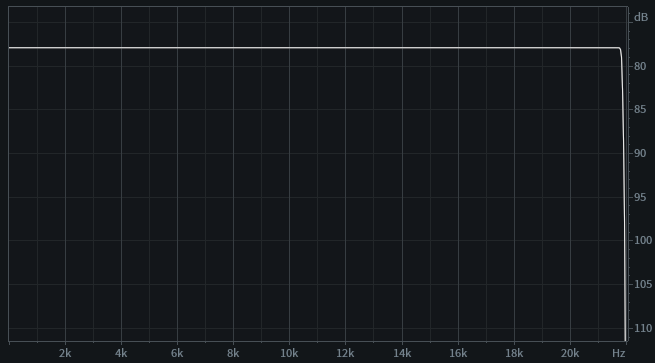
Steep passband 99% - Conversion from 96 kHz to 44.1 kHz
Max | 99.7% passband

Max sweep 99.7% - Conversion from 96 kHz to 44.1 kHz

Max passband 99.7% - Conversion from 96 kHz to 44.1 kHz
Allow aliasing
Aliasing above the passband is allowed. For example, with 44.1 kHz sampling rate and a 95% passband, frequency content above about 21 kHz can be distorted. Since this is above the highest frequency of interest in most listening situations, it may not be a problem. Allowing aliasing can reduce processing time and reduce transient echo artifacts by almost half.
Aliasing is automatically disabled if the source or destination sample rate is below 44.1 kHz.
Default | 95% passband | Allow aliasing

Default sweep 95%, aliasing allowed - Conversion from 96 kHz to 44.1 kHz

Default passband 95%, aliasing allowed - Conversion from 96 kHz to 44.1 kHz
Steep | 99% passband | Allow aliasing

Steep sweep 99%, aliasing allowed - Conversion from 96 kHz to 44.1 kHz

Steep passband 99%, aliasing allowed - Conversion from 96 kHz to 44.1 kHz
Max | 99.7% passband | Allow aliasing

Max sweep 99.7%, aliasing allowed - Conversion from 96 kHz to 44.1 kHz

Max passband 99.7%, aliasing allowed - Conversion from 96 kHz to 44.1 kHz
DSP Digital signal processing
- EBU R 128 | ReplayGain v2 loudness metadata scanning
- EBU R 128 | ReplayGain v2 loudness normalization
- Integrated [I]
- Top of Loudness Range [ToLR]
- Peak limiting (Sample Peak & True Peak)
- Sample Peak and True Peak normalization
- Leading and Trailing Silence Removal
- Fade In/Out effects
- De-emphasis for Audio CDs with pre-emphasis

Metadata Preserve tags during resampling
Metadata tags, album artwork and embedded images can be preserved while changing sample rate, bit depth, bitrate and audio format. Complete album information can also be downloaded from online metadata services before conversion.
Online metadata services
Download high-quality metadata and album artwork from multiple online metadata services. Metadata can be fetched automatically or searched manually using keywords, helping you keep converted files clean and organized.
Get metadata from
GD3, MusicBrainz, Discogs, Deezer, Amazon

Built-in Audio Codecs for High-Quality Sample Rate Conversion
All audio codecs are included within the software. There is no need to get additional audio codecs from external sources.
All encoders and decoders work in high-resolution mode using 32-bit floating-point or better accuracy. High-resolution mode helps avoid unnecessary processing loss when converting from lossless, lossy and high-resolution sources.
Lossy and DSD codecs
| Encoder | Input bit depth | Encoder precision |
|---|---|---|
| AAC-LC & HE-AAC (v2) | 32-bit floating point | 32-bit floating point |
| xHE-AAC | 32-bit floating point | 32-bit floating point |
| MP3 | 32-bit floating point | 32-bit floating point |
| DSD | 32-bit floating point | 64-bit floating point |
| Vorbis | 32-bit floating point | 32-bit floating point |
| Opus | 32-bit floating point | 32-bit floating point |
| Musepack | 32-bit floating point | 32-bit floating point |
| AC3 | 32-bit floating point | 32-bit floating point |
| Decoder | Output bit depth | Decoder precision |
|---|---|---|
| AAC-LC & HE-AAC (v2) | 32-bit floating point | 32-bit floating point |
| xHE-AAC | 32-bit | 32-bit |
| MP3 | 32-bit floating point | 32-bit floating point |
| DSD | 32-bit floating point | 32-bit floating point |
| Vorbis | 32-bit floating point | 32-bit floating point |
| Opus | 32-bit floating point | 32-bit floating point |
| Musepack | 32-bit floating point | 32-bit floating point |
| AC3 | 32-bit floating point | 32-bit floating point |
Lossless Audio Conversion for FLAC, WAV, ALAC and AIFF
All lossless PCM codecs such as FLAC, WAV, Apple Lossless, AIFF, APE, AU, TTA and W64 preserve the source bit depth by default unless a different output bit depth is selected.

Supported Output Audio Formats
Supported Input Audio Formats
Sample rates
Sample rates
Bit depths
Bit depths
Channels

Mono

Stereo

4.0 Quad

5.0

5.1

6.1

7.1
Channels
Mono
Stereo
4.0 Quad
5.0
5.1
6.1
7.1
Sample Rate Converter FAQ
What is a sample rate converter?
A sample rate converter changes the number of audio samples per second so that audio recorded or encoded at one sample rate can be used at another sample rate.
Can I convert 96 kHz audio to 44.1 kHz?
Yes. EZ CD Audio Converter can convert high-resolution audio such as 96 kHz, 192 kHz and 384 kHz to 44.1 kHz, 48 kHz or another output sample rate.
Does sample rate conversion reduce audio quality?
Poor sample rate conversion can introduce distortion, aliasing or transient artifacts. EZ CD Audio Converter uses the high-quality SoX resampler to provide transparent audio conversion with excellent aliasing suppression.
Is sample rate conversion gapless?
Yes. Sample rate conversion in EZ CD Audio Converter is gapless, so there are no erroneous samples at track transitions in the resampled audio signal.
Can I batch convert sample rates?
Yes. EZ CD Audio Converter can batch convert audio files while changing sample rate, bit depth, bitrate and audio format.
Explore EZ CD Audio Converter.
See the audio converter, CD ripper and disc burning tools in action.


Ready to try EZ CD Audio Converter?
Free 21-day Windows trial with no obligation.